Works / EmployeeCare · Leave Request Automation
The Leave Request That Doesn't Sit Unseen
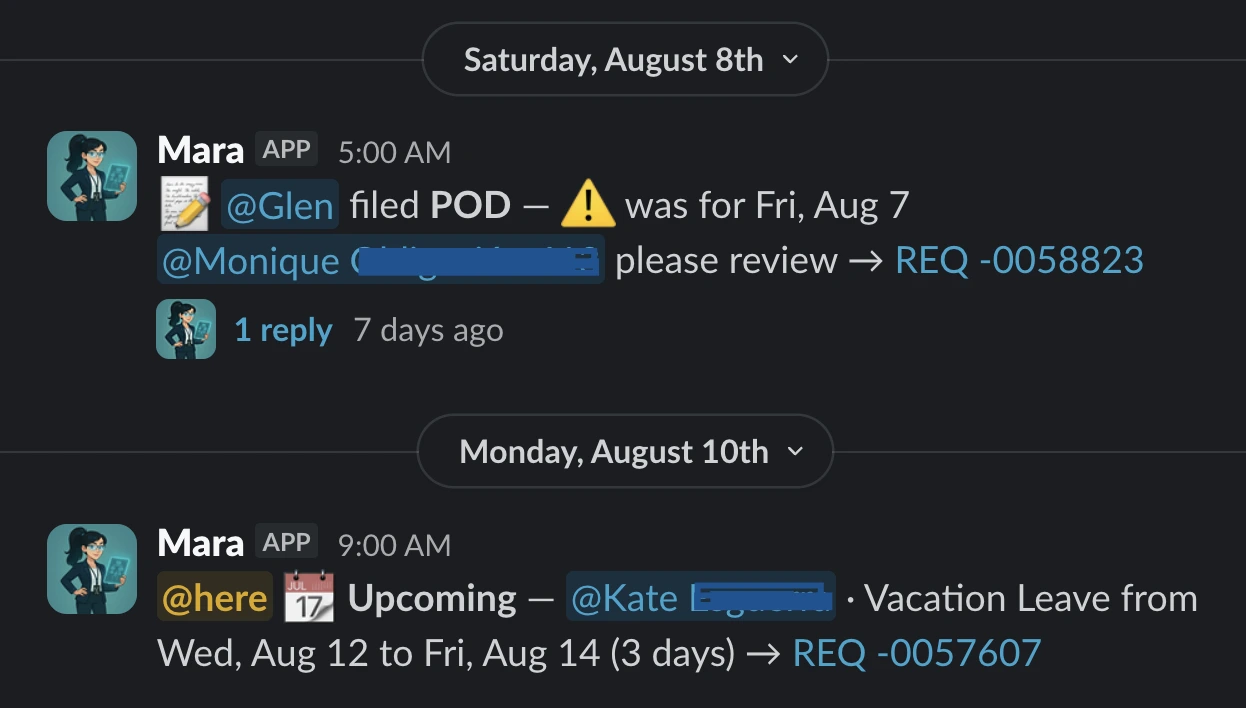
File it once. Your approver gets tagged with the link to act on, the room hears before you're out, and both calendars mark themselves.
Client: Marketing Team · Role: Automation Engineer · Year: · Stack: n8n · Salesforce · Slack · Asana
The story
The before: Leave was filed into HR records nobody watched, so it surfaced when someone was already out. Both calendars were kept by hand — so the conscientious filed everything twice and everyone else left blanks.
The turn: So I built EmployeeCare. Filing tags your approver with the record link; the room hears at approval and again three days before you're out; the calendars keep themselves.
How it works
- Salesforce: Leave records are read, never written to — and scoped person by person, because 7 of the 13 sit outside marketing, where a department filter would have missed them.
- Asana + Calendar: It reads what's already there first — block the day out yourself, then file it properly, and it attaches instead of announcing twice.
- Slack: A leave filed months early stays quiet until it's close. Then filing tags your approver inside the last week, and the room gets three days to plan around it — and a leave cancelled in between is dropped before that warning goes out.
- Both calendars: An all-day entry per leave, created, updated or removed to match the record — only ever ones it made itself.
Writing into systems people also keep by hand is the whole difficulty — the worse failure is writing back the other way and corrupting the record everyone trusts. So the part that marks the calendars holds no HR credential at all: writing back isn't forbidden, it's impossible. And it never touches an entry it didn't create.
What changed
has anyone approved my leave yet? who's out next week? do I need to file this twice?
The numbers: 0 — duplicate notices for the same leave, across a 30-day replay.
Fair questions
do I still need to add it to the calendar myself?
No — that's the point. Anything filed in HR reaches both calendars on its own. (from the announcement)
what if I don't have access to the HR system?
The PTO board works instead — an entry titled with your name and the leave code gets picked up and synced on. (from the announcement)
is there AI in this?
None. A leave notice you can't predict is one nobody trusts.
The reel continues
Previous: QAWebLedger · Post-Deploy QA Checklist · Next: MARA · Client Shortlisting · open my notebook?
Got a team that finds out you're off today, too late, by accident? File It Once — or discover my mastery.